Why it matters
Review time is better spent resolving a defined engineering question than repeatedly locating the same section of track. Bringing location and alignment data together helps teams establish what the delivery contains and communicate what still needs clarification.
Section 1
A visible corridor still needs a review location
The model opens, the tracks look familiar, and someone asks about the transition near the next structure. The first minutes disappear into orientation: which alignment, which direction, and which position does everyone mean? A convincing view of the railway does not answer those questions on its own.
ExyViewer’s alignment workspace helps connect a review location to the information behind it. The useful outcome is a shared reference for discussion: this alignment in this model, at this distance or verified station, with these source parameters. That gives railway engineers and coordinators a clearer starting point for review.
Section 2
Why geometry alone is not enough
A rail corridor can look coherent while leaving important review questions open. Does the exchanged file contain an alignment definition, or only visible track products? Are vertical parameters present? Is the apparent banking supported by cant information? Can the team connect a station label to a resolved position on the route?
Reviewing alignment data alongside the model helps distinguish a visual impression from delivered information. It also makes missing data a concrete exchange question. If a component is absent or cannot be reconstructed, the reviewer can ask about that condition instead of treating a plausible-looking corridor as evidence that the delivery is complete.
Section 3
Start with the Alignment Inspector
Select the alignment in ExyViewer and confirm the owning model, name, source identity and units. The Alignment Inspector provides horizontal, vertical and, when present, cant layouts, plus associated referents. Its tables retain source segment identifiers and design parameters, so the reviewer can identify what a displayed value belongs to.
The supported centerline can be selected and fitted in the viewer. Geometry coverage is reported as complete, partial or unsupported, with explanatory reasons. Read that status before relying on navigation: complete coverage describes the supported reconstruction, not approval of the railway design. Missing source values remain distinguishable from actual zero values.
Section 4
Keep stationing separate from distance along
Distance from alignment start is useful for orientation, but it is not automatically project chainage. ExyViewer preserves source station annotations and evaluates numeric IFC stationing separately. Continuous station navigation requires at least two distinct, resolved Pset_Stationing anchors with a consistent direction and offset, and applies only within their verified range.
Where those conditions are not met, use distance along and the individual source referents without relabelling them as a continuous chainage system. Station equations or inconsistent anchors prevent that mapping. During a meeting, state which reference you are using and its units. This avoids passing an apparently precise location into an issue that another team interprets differently.
Section 5
Review horizontal segments and the vertical profile together
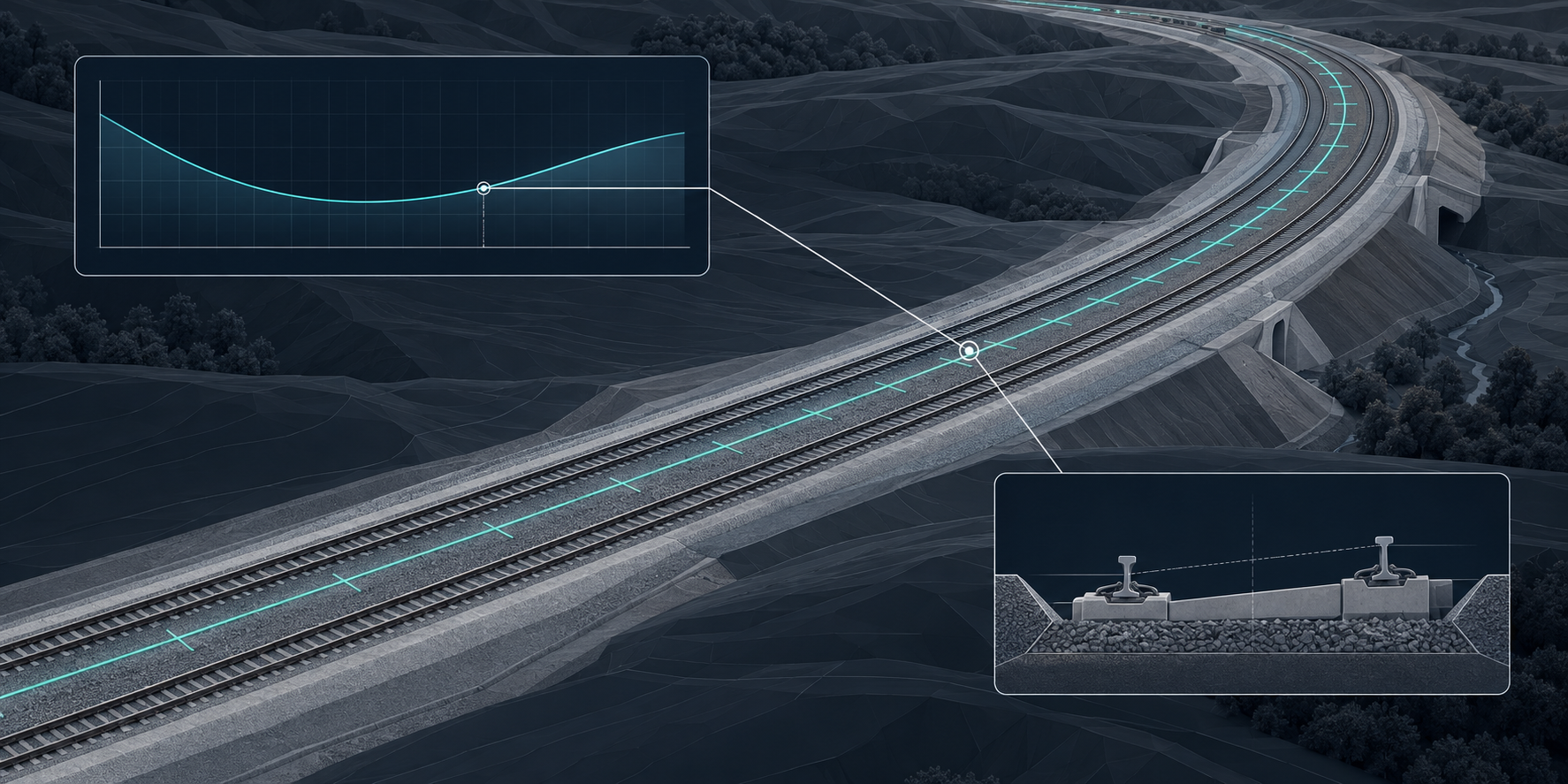
Use the horizontal table to inspect segment order, lengths, directions and curvature parameters. Then examine the vertical layout’s start distances, heights, lengths and gradients. The vertical profile is derived from source parameters; selecting a supported profile segment or table row links the selection to the viewer, and position navigation can show the corresponding location on the profile.
This gives the team a practical way to discuss where a gradient change sits relative to the corridor geometry. The profile exaggerates elevation, so judge values from the parameters rather than the apparent slope on screen. Unsupported profile segments appear as gaps; their source parameters remain available in the table.
Section 6
Inspect cant values at the location under discussion
When cant data is present and evaluable, the Inspector shows left and right values, their difference, rail-head distance, angle and interpolation type at the selected position. The cant table also exposes source start and end values. Review the sign, units and transition endpoints against the project’s intended convention instead of inferring cant from the perspective view.
For a transition question, compare a position before the change, one inside it and one after it. Optional rail references help illustrate the evaluated positions; they are diagnostic lines, not physical rail products. Unavailable evaluation is a reason to inspect the source and coverage messages, not to assume the cant is zero or acceptable.
Section 7
Turn a review observation into a useful question
A focused review can start with one suspect transition. Confirm the alignment and source units, navigate to the supported position, inspect the horizontal segment, compare the profile and read the available cant. Ask whether the delivered values and visible context are coherent enough for the intended review, then identify the point that needs a designer’s response.
Record the model revision, alignment name or identifier, distance or verified station, relevant segment identifiers and observed values when communicating the issue. ExyViewer helps bring those references into one review context. The reviewer still needs to formulate and record the question; alignment selection does not itself constitute an engineering issue report or an automatic correctness check.
Section 8
Who benefits, and where the limits remain
Railway engineers gain a more explicit location for technical discussion. BIM coordinators can distinguish missing alignment information from a geometry-only exchange. Infrastructure reviewers and digital delivery leads can establish whether a package contains information that is usable for the agreed review before relying on it for coordination or downstream reporting.
Reconstruction has limits. Horizontal support covers lines, circular arcs and clothoids; vertical support includes constant gradients, parabolic arcs and supported circular arcs. Placements, units, incomplete parameters and ambiguous layouts can still restrict coverage. Source data visibility and geometric support are different things. Use the displayed warnings to define follow-up work, and retain project design checks and engineering judgment.
Section 9
A clearer basis for the next engineering decision
The practical value is the ability to discuss alignment location and alignment data together. A team that can name the route, locate the question and inspect the delivered parameters spends less effort reconstructing context. That makes a review conversation more precise before an unresolved assumption reaches coordination, reporting or another delivery package.
Start with one alignment and one question. Confirm what the IFC actually contains, acknowledge the coverage limits, and use ExyViewer to keep the geometry and its engineering references in the same conversation.
Practical takeaways
- Confirm the alignment identity, source units and geometry coverage before navigating.
- Keep distance along separate from verified IFC stationing.
- Review the profile, segment parameters and available cant at a shared location.
- Record model revision, alignment identity, position and the question requiring a response.
Reality check
- This is an inspection workflow, not automatic design approval or engineering certification.
- Station equations and inconsistent anchors prevent continuous IFC station navigation; individual source values remain available.
- Supported reconstruction depends on curve type, placement, units and source completeness. Gaps and partial coverage need investigation.
- The hero is a conceptual illustration, not a screenshot of the ExyViewer interface.
Related commands and features
Alignment Inspector, Centerline and annotations, Horizontal and vertical segments, Cant and referents
Review an alignment with its data
Open a railway IFC model in ExyViewer, select its alignment and start with one location you need to understand. Inspect the source information before deciding what the project should do next.
Open ExyViewer